Getting high-quality backlinks is tough. Guest posting takes forever, cold outreach often goes ignored, and buying links is risky. That’s why so many SEOs and site owners eventually ask: is there a better way?
I’m Elena, and I’ve been doing link building for more than 5 years. Today, I’ll walk you through an alternative tactic you can use in your next campaign—broken link building.
In this article, you’ll learn:
- What broken link building strategy actually is
- How to find broken backlinks
- How to do broken link building step by step
- And the exact tips I use to make it worth the effort
Let’s get started.
Highlights
- Broken link building means finding dead links on relevant sites and suggesting your content as the replacement.
- The best opportunities come from resource pages, stats posts, and checklists with lots of outbound links.
- Use tools like Ahrefs, Semrush, or Google operators for prospecting broken links.
- Always check link quality: prioritize relevance, authority, traffic, and dofollow status.
What Is Broken Link Building?
Ever clicked on a link, only to land on a 404 error page? That’s what we call a broken (dead) link. Here is an example of a broken link:
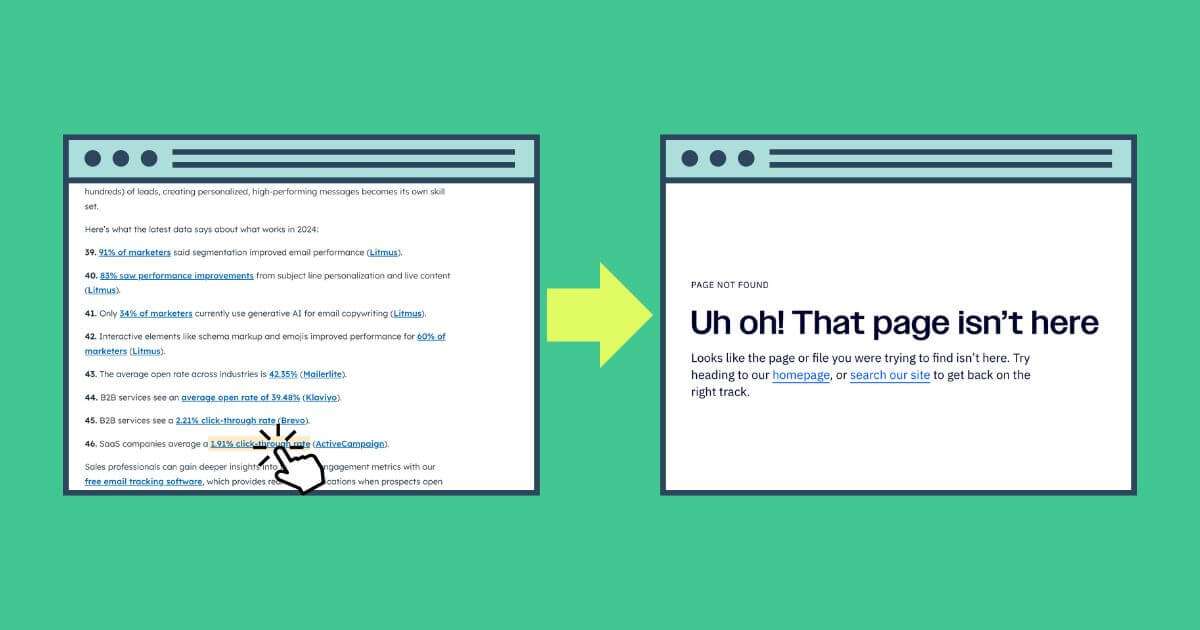
It usually happens when:
- A piece of content gets deleted or moved without a redirect
- The site itself goes offline
- Or someone simply mistyped the URL in the first place
Now here’s where broken link building comes in.
Instead of those links sending people (and Google’s crawlers) to a dead end, you step in with a helpful and working alternative. The idea is simple:
- Find broken backlinks in your niche.
- Create or repurpose content that matches what was originally there.
- Reach out to the website owner and suggest a link to your content as a replacement.
Broken link building is a niche edits tactic. A niche edit adds a contextual link to an existing, indexed page rather than publishing a new post like you would with guest posting.
If you want to learn more about the difference between the two most popular link building strategies, I invite you to read my post about guest posts vs. niche edits.
Why Does Broken Link Building Work So Well?
Broken link building is one of those rare strategies where everyone gets something in return:
- The site owner gets to clean up their page and improve user experience.
- You get a relevant backlink that can improve your search result positions.
Unlike cold outreach, which is often a one-way ask, broken link building lets you offer value in return. That simple difference is what makes it one of the most effective link acquisition techniques.
And when it works, the benefits stack up fast. You get:
- High-quality backlinks that actually make sense in context.
- Improved website authority because trusted publications are referencing your brand.
- Stronger search visibility, as those links signal credibility to Google.
- More qualified traffic, since those links come from relevant sites in your niche.
But this strategy has drawbacks.
It’s time-consuming, which is why opinions online are split on its effectiveness.
In my experience, if you need links at scale, other niche edit strategies tend to work better. That’s why I wouldn’t rely solely on broken link building.
That said, every so often, you might uncover a truly “golden” dead page with dozens of referring domains, and when you do, broken link building can deliver great results.
Step-by-Step Guide on How to Do Broken Link Building
Now that you’re familiar with the broken link building strategy, I’ll walk you through how to build broken links.
I’ll be frank: this isn’t the easiest task, especially without the right tools. But I’ll show you my process and try to make it as straightforward as possible.
Let’s dig into it.
Step 1: Find Broken Link Opportunities
Personally, I prefer Ahrefs for this step because you have all the necessary data in one place, and it saves a lot of time.
But if you don’t have access to paid tools, don’t worry—you can still do this manually (I’ll show you how in a bit).
For now, let me walk you through the methods I use to find broken pages.
Finding Broken Links With Ahrefs: Method #1
Go to Content Explorer and search for your topic. Toggle Only broken and sort by Referring domains.
Turn on One page per domain to refine your results. Otherwise, you will see dozens of unrelated broken links from one domain, which will clutter your search results and make it harder to work with the list.
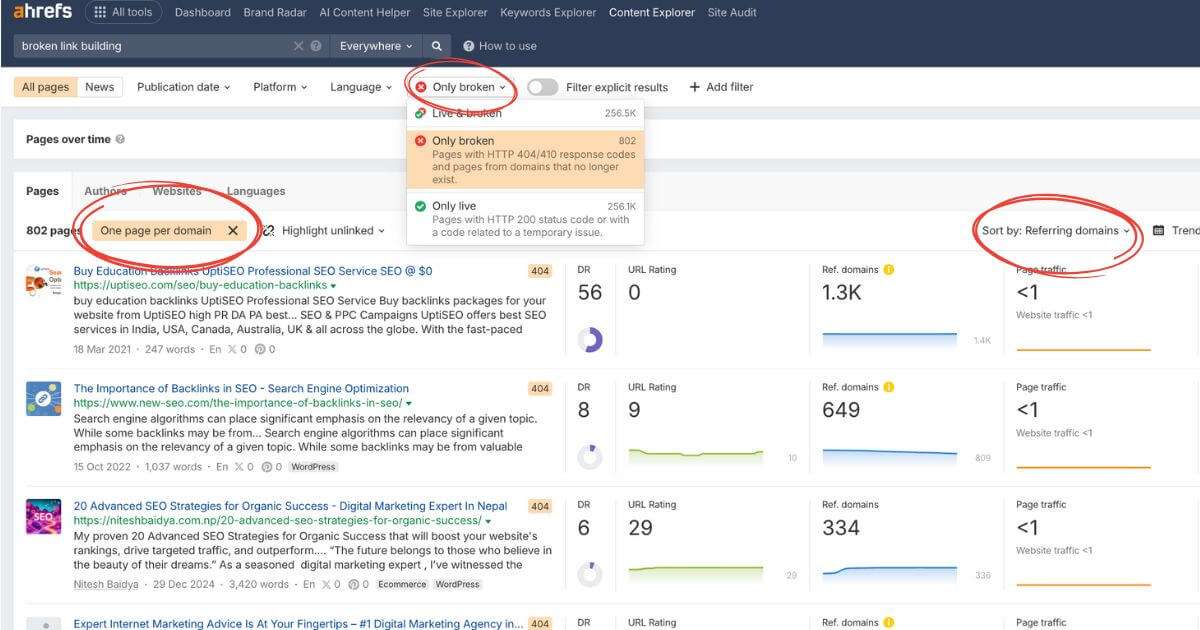
This method surfaces dead pages with proven demand (many sites linked to them). I prioritize anything with five or more referring domains and a clear topical match.
Finding Broken Links With Ahrefs: Method #2
This method works best when competitors cover the same topics as you and have already attracted the links you want. What you will do here is audit their backlink profiles and try to find the pages linking to their 404s.
Go to Site Explorer and paste the website you want to analyze. Sort the results by Best by links (HTTP code 404).
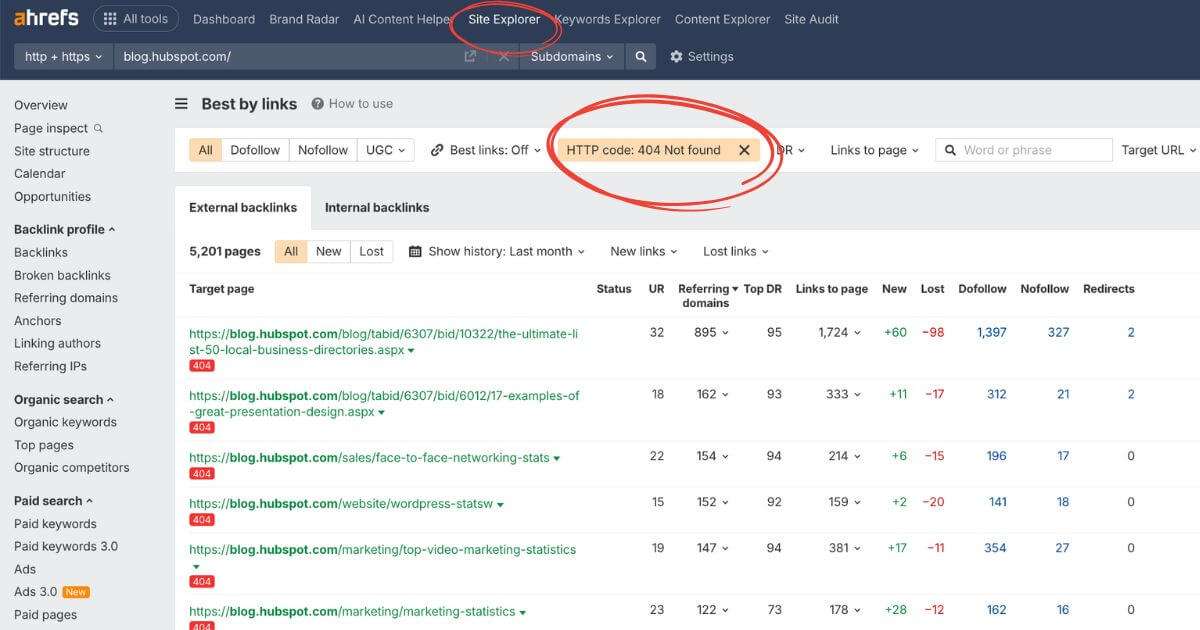
Next, click on the Links to page report for each dead URL and note the sites listed there; that’s your potential prospect list.
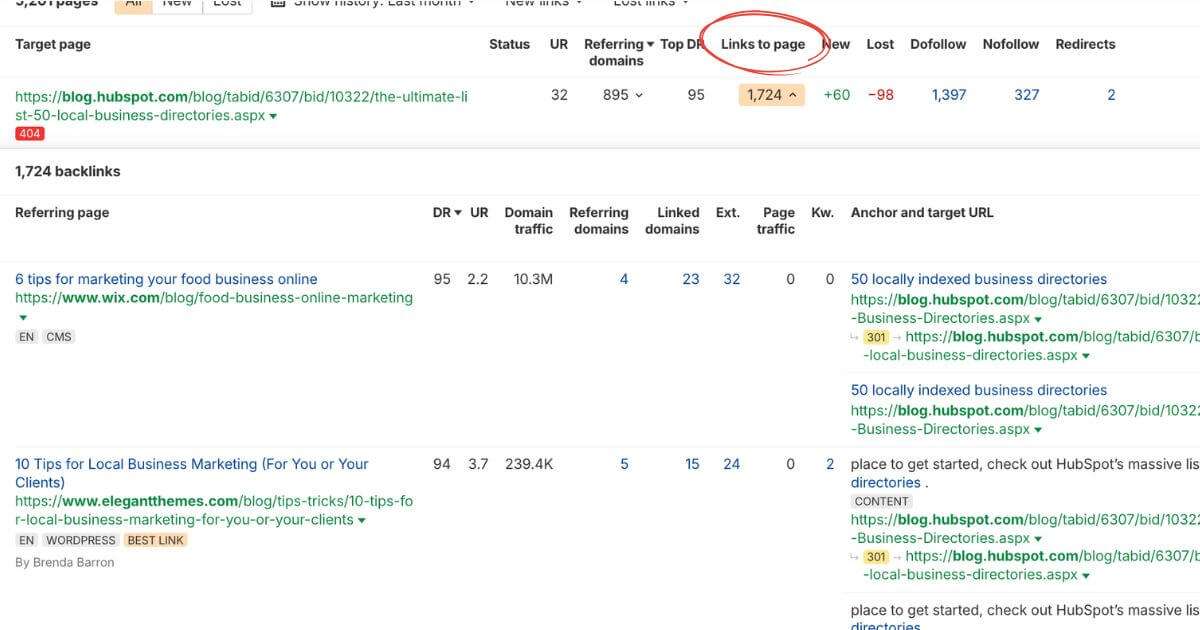
You can then filter the list by Domain Rating (DR) and choose the best domains that fit your link building needs.
Finding Broken Links With Ahrefs: Method #3
Use this method when you want to uncover broken backlinks on a specific website you’d like a link from.
Once you’ve found them, you can pitch your existing content (or create something better) as a replacement.
To do this, we will use the Site Explorer feature again with the site you want a link from.
When you look at the Outgoing Links tab and head to Broken Links, this will show you which pages on the site contain dead outbound links.
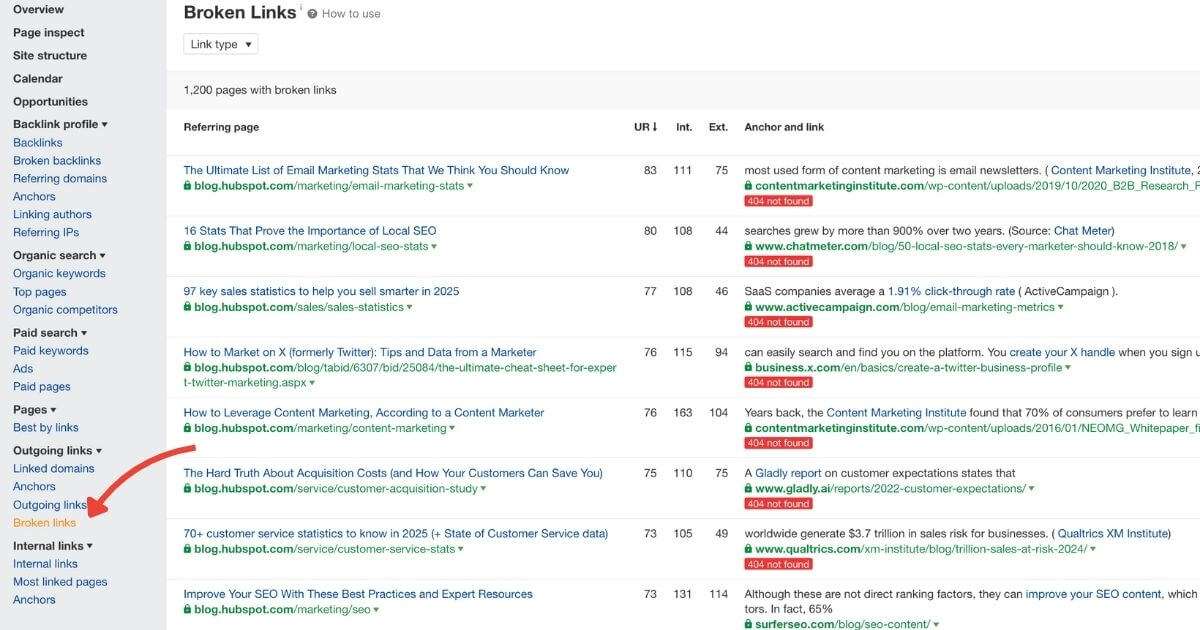
The downside is that the report doesn’t have strong filtering options.
The best move is to export the full list, then sift through it manually to find the opportunities that make sense for you.
Finding Broken Links With Google Operators
I’ll be honest: this approach isn’t for the faint of heart.
It takes patience, a lot of manual digging (and way too many open tabs). But sometimes, this is the only option you’ve got.
So, how do you do it?
First, focus on pages that naturally have lots of outbound links.
The more links a page has, the higher the odds that some of them are broken.
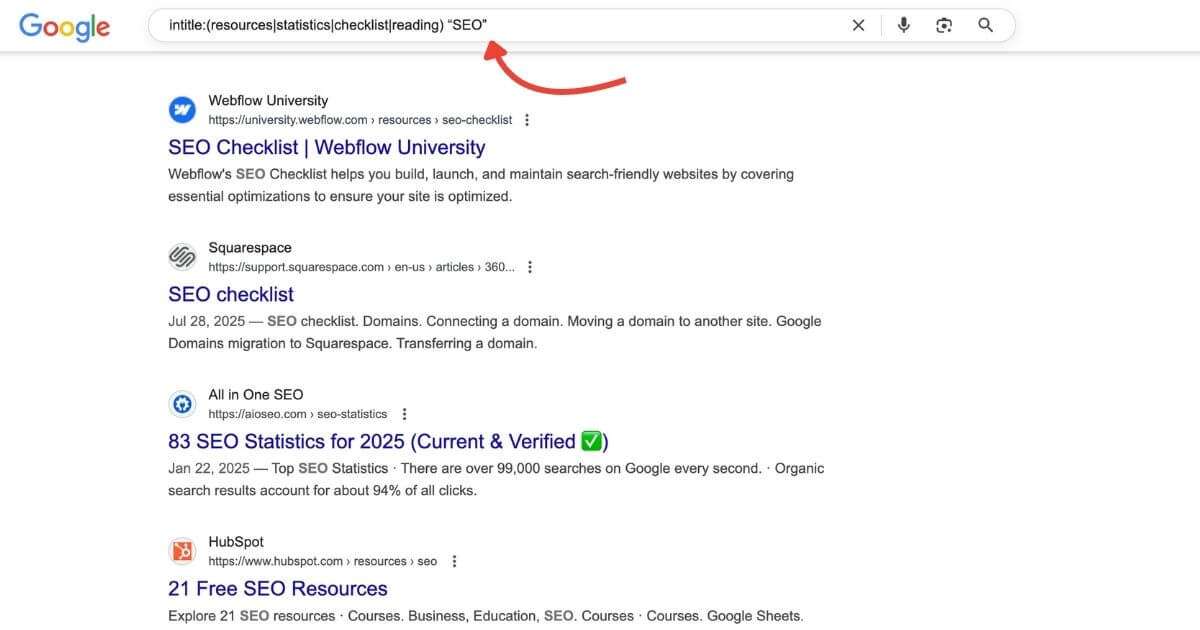
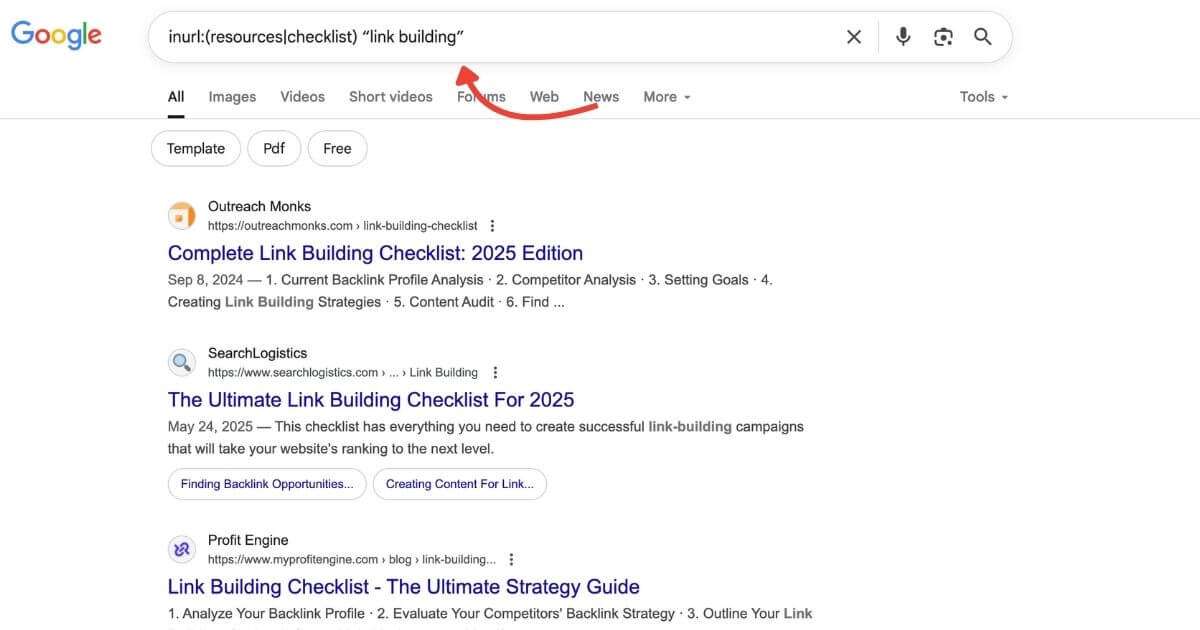
From my experience, resource pages, checklists, and statistics articles are the best places to start.
In Google, use the following search operators:
- intitle:(resources|statistics|checklist|reading) “your topic”
- inurl:(resources|checklist) “your topic”
- “your topic” + “helpful resources”
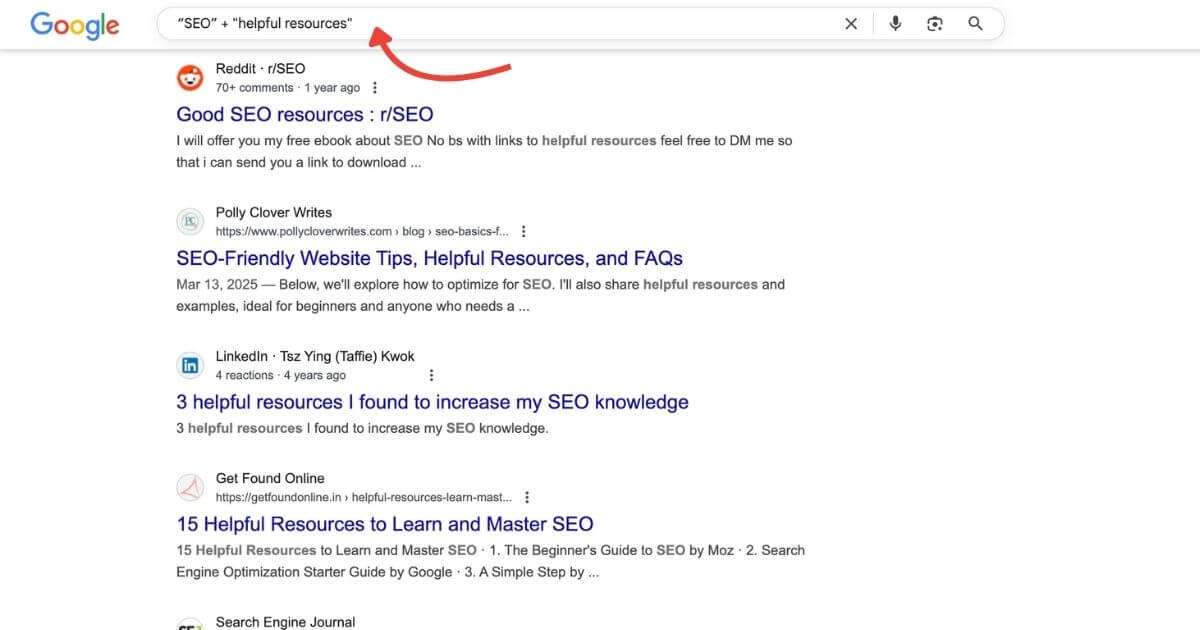
These queries pull up curated lists and resource pages.
You will often see older pages, which can mean more broken backlinks, but those websites can sometimes also be inactive. A quick clue is if the blog hasn’t published in years, the design looks outdated, or basic pages don’t load properly. Keep that in mind before spending time on outreach.
So, don’t stop at just one keyword.
If your topic has synonyms, run them separately. For example, for link building, I’d try “email outreach”, “cold email”, and “link outreach”. Each one brings up a different set of pages, and not every result will be a resource page.
Sometimes you’ll get random blog posts or completely unrelated pages. That’s normal. The point is to cast a wider net so you don’t miss the pages that actually matter.
Once you get a list of potential targets, it’s time to analyze them.
Here’s where tools can help:
- SERP scraping tools can quickly pull all your results into a spreadsheet.
- Chrome extensions like Ahrefs SEO Toolbar can scan every link on a separate page and highlight the broken ones instantly.
As I said, this is a tedious process, but it’s also how you will spot link opportunities that automated tools overlook.
Step 2: Evaluating Link Quality and Relevance
Not every broken link you find is worth chasing. Some will be from spammy sites, while others will be from irrelevant blogs that won’t make a significant impact.
That’s why this step matters:
To get the best results from your link building campaign, you need to target the right websites.
So, what do I look at?
First, relevance. If the site’s content and audience don’t align with yours, it doesn’t matter how strong the metrics are. Google values topical relevance, and so should you.
Second, authority and traffic. I usually check:
- Domain Rating (DR) or Domain Authority (DA) as a quick benchmark.
- Whether the site actually gets organic traffic. A DR 70 site with zero traffic usually means that the metric is manipulated.
Third, the link itself:
- Is it a dofollow link, nofollow, or does it have ugc attributes?
- Does it sit in the main content of the page, or is it buried in a footer or sidebar?
Once you’ve checked those boxes, it’s time to filter. My rule of thumb:
- Prioritize high-authority, niche-relevant links.
- Skip links from spammy or off-topic pages, even if the metrics look good on paper.
Remember: one strong, relevant backlink beats ten weak ones that don’t fit your niche.
Step 3: Creating or Identifying Replacement Content
Now comes the part that can make or break your success: the content you suggest as a replacement.
Even if you’ve found the perfect broken link opportunity, your pitch won’t land unless your content makes sense in that exact context.
So, what are your options?
1. Use what you already have
Sometimes, one of your existing articles or resources will be a suitable fit. If the content covers 70–80% of what the dead page was about, you can usually pitch it.
Alternatively, you can update it slightly so it feels like a natural replacement. Add a missing section, refresh the stats, or tweak the headline a little.
Here are a few tips to increase acceptance:
- Make your version easier to read (clear headings, short paragraphs).
- Add fresh data or visuals (charts, images, tables).
- Link to other trustworthy sources so it looks well-researched.
- If possible, create a direct jump link to the exact section the editor can link to.
2. Create a new piece
If you don’t have anything relevant, write it. This doesn’t have to mean a massive 5,000-word guide. Often, a focused article or a well-structured checklist is enough to make your outreach credible.
Here’s a little trick:
Plug the broken URL into Wayback Machine. You’ll often see what the page used to look like. Use this as a blueprint. Then, create something that matches the same intent, but better.
And remember: webmasters are looking for a quick fix to a problem on their site. The closer your replacement feels like an easy swap (while still being an upgrade), the higher your success rate will be.
Step 4: Outreach and Link Building
Outreach can seem confusing at first. However, once you get the hang of the process, it gets easier.
Most SEOs mess this up by blasting generic templates. Don’t do that. A good outreach email should feel like it was written for that person, not copied from a script.
I’ve found outreach works best when you follow four simple rules:
- Keep it short: Under 120 words usually gets the best response.
- Be specific: Mention the exact page and link that is broken, and make it easier for them to locate it.
- Show relevance: Explain why your page is a good fit to replace the broken one.
- Add extra value: Point out one or two other broken links on their page, or give them a quick suggestion that makes their page better.
So, here is an example of how my outreach email would look:
Subject: Broken link on [Page Title]
Hi [Name],
I was browsing your page [URL] and noticed that the link to [Anchor Text] points to a 404.
Since I cover the same topic, I thought you might find this resource useful as a replacement: [Your URL].
Also, I spotted a couple of other broken links on the page, if you’d like me to send them over.
Hope this saves you some time!
Best,
[Your Signature]
The goal isn’t to “sell” your content. It’s to help the site owner fix a problem while naturally suggesting your resource as the solution.
I published a post on outreach link building, where I shared all the tools and resources I use to find the right contacts. Feel free to give it a read.
Step 5: Tracking, Measuring, and Scaling Success
Once you’ve sent your outreach and landed some links, the next step is tracking results.
Why?
Because without tracking, you won’t know which opportunities are driving meaningful results and which ones are worth pursuing in the future.
From my experience, these metrics are enough to tell you everything you need:
- Acquired backlinks: How many new links did you actually acquire?
- Referral traffic: Are people clicking through those links?
- Ranking improvements: Do your target pages move up in Google results?
- Response and placement rates: How many replies and live links have you got per batch of outreach?
When it comes to tracking tools, you don’t need to overcomplicate things, either. I usually combine:
- Google Search Console for rankings and impressions.
- Ahrefs / Semrush for backlink monitoring.
- A simple spreadsheet to log prospects, outreach status, and results.
That’s really all you need. You don’t want to waste your time chasing numbers instead of backlinks.
Expert Tips
For a clearer view beyond my own experience, I asked a few link building experts to weigh in with their advice on broken link building. Here is what they had to say:
“The biggest myth in broken link building is that success comes from finding every 404 and sending mass emails. That’s why most beginners fail.
The real play is context. If you pitch a replacement link that doesn’t fit the intent of the original page, editors will ignore you. Before reaching out, check what that broken link used to be with tools like Wayback Machine. Then, create or match content that’s as close as possible in purpose. You’re not just fixing their link, you’re helping them preserve their page’s value.
Editors get hundreds of generic outreach requests. The one that lands is short, specific, and shows you did the homework. I tell clients, ‘A relevant replacement is ten times more powerful than a long outreach list.’
That mindset turns broken links from a numbers game into a trust-building tactic.” — Mike Khorev, SEO Consultant, Mike Khorev
“The real secret to successful broken link building isn’t just finding broken links, but finding valuable broken links. Most beginners waste time chasing easy to find broken links on low authority sites.
I would recommend you use tools like Ahrefs or SEMrush to find high authority sites that have a specific broken outbound link with many referring domains. You can then create new high quality content that replaces the dead page and reach out to all the sites that are linking to it. This gives you one great piece of content that can get you dozens of high value backlinks with one campaign.” — Nirmal Gyanwali, Website Designer, Nirmal Web Agency
“Here’s one thing about broken link building most beginners don’t know:
You want to replace the broken link with one that’s of better value, not equal or worse.
Just because their site has a broken link, doesn’t mean they will be willing to link to yours. You need to ask yourself the question: Will the link to your site strengthen or weaken the relationship the website owner has with their customer base?
Sure, making them aware of the broken link is valuable by itself. But imagine pitching them with a piece of content that’s leap-bounds ahead of the broken link. That’s gold.” — Danyon Togia, Founder, Expert SEO
That’s a Wrap
Broken link building isn’t the easiest link building tactic out there. It requires patience and a bit of trial and error. But when you do it right, you walk away with relevant and high-quality backlinks.
So, to sum up how to do broken link building: find broken links on relevant sites, create or repurpose content that matches what was originally there, and reach out to the site owner with your resource as a replacement. That’s the entire process in one line—everything else is just about refining each step.
And if you’d rather skip the tedious parts, you can always let us handle it for you.
FAQ
How do I do broken link building for free?
You can start with nothing more than Google. Search for pages in your niche using relevant Google search operators, then manually check those pages for broken links. Chrome extensions like Ahrefs SEO Toolbar can help spot any 404 dead link. It’s slower than using specialized software, but it works.
Which tools give the most accurate broken link discoveries for niche sites?
Ahrefs and Semrush are the most reliable for finding broken links at scale. Another option you can try is Screaming Frog. The tool can crawl entire domains and spot dead links in no time, but it has a learning curve. If you’re just testing the waters, free link checker Chrome extensions can also do the job.
How do I evaluate a broken link’s quality before outreach?
Start with the page that hosts the broken link: if it’s a real, indexed article on a reputable site and the link sits in the main content with a relevant anchor, it’s a good candidate.
Pro tip: glance at the dead URL’s referring domains. If several solid sites link to it, prioritize it because your replacement can land here and be reused with the other linking pages.
What success metrics should I track to measure a broken link campaign?
The big four are: response rate (how many replies you’re getting), placement rate (how many links actually go live), link quality (authority + relevance of acquired links), and impact on rankings/traffic (watch your target pages in Google Search Console or Ahrefs).
How should I create replacement content that closely matches the dead page?
Check the dead URL in Wayback Machine to confirm what it covered and make sure your replacement matches the same intent. The closer (and more useful) your page is to the original, the easier it is for a site owner to swap the link.
What outreach email scripts tend to get the highest response rates?
The ones that are short, helpful, and personal. The best-performing emails I’ve sent are concise, to the point, and respectful to the site owner.